Microsoft Partner Growth Roadmap: Your Next 90 Days
From a small practice to a stronger Microsoft partner: build toward your first or next designation, get proper credit for customer work, and uncover eligible incentives. PIE Growth Path gives you the plan. Cherry connects next actions, blockers and follow-through to the PIE tools that do the work.
You can deliver great Microsoft projects and still fail to grow your partnership. Maybe your Azure work has no Partner Admin Link, your best-certified engineer is not linked to the organization, or your SOWs never reach the people who prepare incentive claims. An SMB founder wears all these hats, but no one sees the whole picture.
PIE turns that work into a guided journey: understand your Current State, act on the closest real gap, and repeat. Growth Path coordinates the process; Cherry · your PIE assistant helps make the next action clear. The goal is to make more of your existing customer work count—not to invent a shortcut into Microsoft's program.
The 90-day promise, correctly framed
These are 90 days of focused growth actions, not a Microsoft deadline, guaranteed designation, or payout. “Top tier” is an ambition, not a single official Microsoft membership level. PIE Growth Path and Cherry are independently built by AICloudPartners.
See the Real PIE Growth Path in Action
Experience the actual 90-day workspace rather than a static marketing diagram. Select any 30-day phase, use the arrows, or swipe sideways to see how PIE organizes work from onboarding through Microsoft partner attribution, skilling and evidence-backed opportunity development.
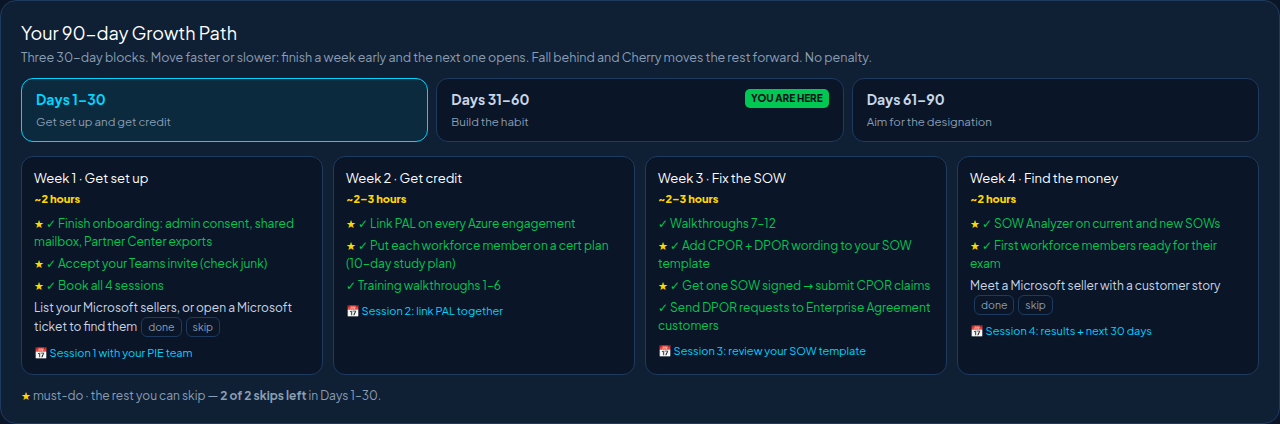
Days 1–30: Build the foundation
Confirm Current State, finish essential setup and turn your first month into concrete partner actions.
- Complete onboarding and learn PIE's core workflows
- Book the included PIE-team check-ins
- Start PAL, skilling and SOW evidence reviews
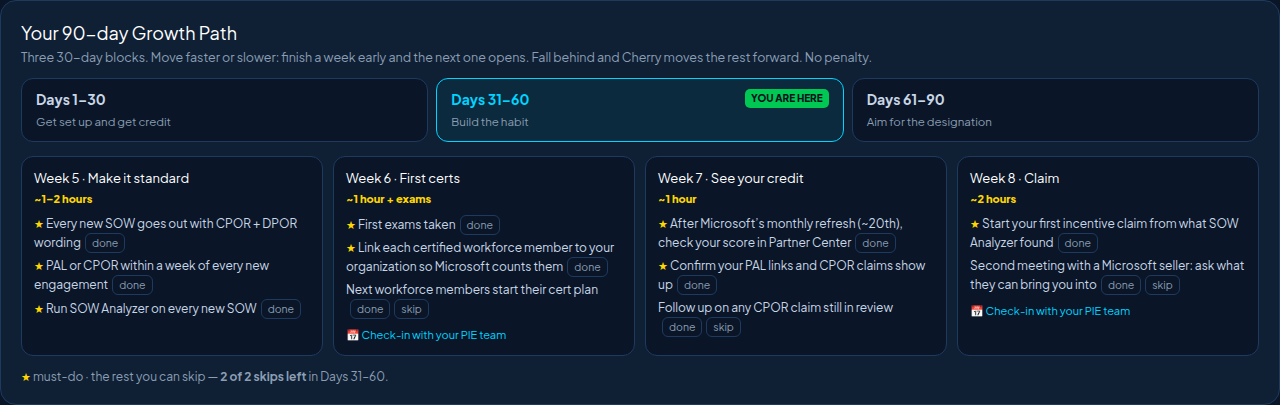
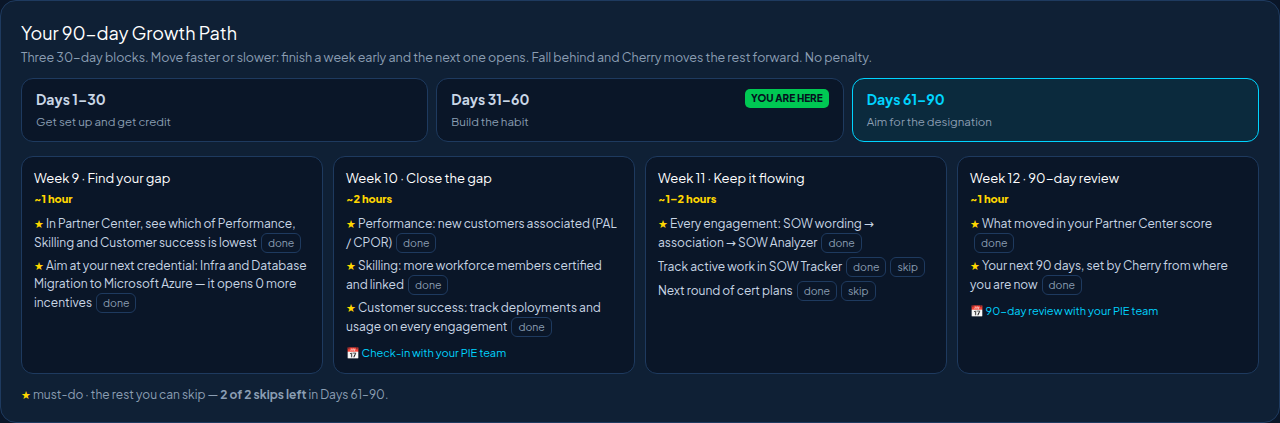
Moves through the three phases automatically. Select a tab, use ← →, or swipe to take control.
What progress looks like by Day 90: your team can show which customer associations are verified, which certifications and claims advanced, and what Microsoft Partner Center still requires. That matters even if a designation has not yet been awarded.
Explore Your Own PIE Growth Path →In This Guide
Interactive: Growth Path Days 1–90Why SMB Partners Need a Growth SystemUnderstand the Partner Capability ScoreThe Eight PIE Growth Path ActionsSOW-to-Incentive WorkflowCherry: Growth, Incentives & Follow-ThroughInteractive: Find Your Next MoveThe PIE Toolkit for GrowthMeasure Real 90-Day ProgressFive Pitfalls to AvoidFrequently Asked QuestionsWhy SMB Microsoft Partners Need a Growth System
Most partners don't need another feature list. They need someone to say: “This is what matters for your current qualifications and customers—do this next.” That decision is harder when one or two people manage sales, engineering, skilling, operations and claims. It also explains why being busy is not the same as being recognized for the work you deliver.
Your goal might be your first Solutions Partner designation, a second solution area, or an advanced specialization. Each calls for different evidence. PIE Current State is the starting point so a partner with zero designations does not receive the same next step as an established provider with several.
First Understand Microsoft's Partner Capability Score
Microsoft's Partner Capability Score (PCS) ↗ measures three categories: Performance, Skilling, and Customer success. Qualifying for a Solutions Partner designation requires at least 70 of 100 points and nonzero scores in every required metric. That is why an excellent certification record alone might not be enough.
Different solution areas have different qualification tracks and thresholds. For example, Modern Work includes an SMB path ↗. Partner Center determines the official track and score; PIE does not invent or replace it. A stronger plan identifies the lowest metric, then connects the right customer, workforce or engagement activity to it.
Make the metric actionable
Choose an outcome Microsoft can recognize: a verified eligible customer association, properly linked certified people, or customer success activity supported by records. Take actions that fit your actual solution area, not somebody else's checklist.
The Eight Actions in PIE Growth Path
PIE Growth Path connects eight practical steps to help you strengthen your Microsoft partnership. Each step gives your team a clear objective, a recommended next action, and access to the PIE tools that support your growth.
Finish onboarding
Complete admin consent, shared mailbox setup and Partner Center exports so PIE has a reliable Current State. Cherry points to an unfinished action.
Training walkthroughs
Use PIE's 12 interactive walkthroughs to become effective at each relevant feature. They are guided walkthroughs, not video courses.
Meet your PIE team
Book four weekly 30-minute check-ins with the AICloudPartners team. Bring blockers and record the next actions.
Connect with Microsoft sellers
Know which Microsoft seller or partner contacts support your practice, or document the route to find them.
Get credit for Azure work
Review Partner Admin Link coverage on eligible customer engagements. The appropriate Azure access must exist first.
Skill your workforce
Choose certifications aligned with your target designation. Use PIE Certify Accelerator (included with PIE for partner workforce skilling) and link achievements to your organization.
Use CPOR and DPOR correctly
Plan proper customer associations, including signed SOW proof where required. DPOR is customer-selected for relevant Enterprise Agreement subscriptions.
Find the money in each SOW
Use PIE SOW Analyzer to investigate claimable opportunities, evidence gaps, improvements and incentives that can legally stack.
Growth Path offers partner-specific priorities and limited skips for applicable steps; onboarding remains foundational. This sequence matches the current Growth Path steps, with training immediately after onboarding. Optional plan actions may be skipped within limits; required actions cannot. These are not eight automatic PCS awards. The official score still comes from Microsoft.
From One Customer SOW to a Defensible Incentive Opportunity
Start with a better question than “How much can we make?” Ask “Which customer work are we doing, and which program rules and records can support it?” A signed Statement of Work (SOW) can be a critical starting point, but it does not guarantee Microsoft approval or payment. PIE SOW Analyzer connects real engagement details to candidate incentive rules and remaining evidence gaps.
- Begin with real customer work. Review the SOW, solution area, planned delivery and available partner qualifications. Confirm missing facts before labeling an incentive eligible.
- Verify the right association. Check PAL where relevant for Azure, CPOR requirements for supported Microsoft 365, Security or Business Applications work, and customer-controlled DPOR for applicable Enterprise Agreement subscriptions. Written language does not replace the actual association.
- Evaluate each potential incentive. Review qualification, dates, market rules, evidence, earning ceilings and stacking restrictions separately. Never add headline maximums into a fictional payout.
- Organize evidence and claims. Keep required signed SOW proof, delivery records and association status in the right workflows. SOW Tracker, Incentive Claims and ISSI Evidence support follow-through; Microsoft's systems decide approval.
- Separate candidate from paid. An identified program is not a submitted claim; submitted is not approved; approved is not necessarily paid. Cherry can explain the next blocker and where to go in PIE, but does not autonomously file claims.
Illustrative partner scenario — no invented revenue
A two-person partner has completed an Azure migration SOW. The team checks its Azure association, uses PIE to review relevant incentives and missing proof, and assigns an owner to the next verifiable action. The useful outcome is a defensible plan—not a manufactured $500K opportunity or promised payment.
Ask at your next PIE check-in: “Which active SOW has the strongest evidence-backed opportunity, and is the next blocker with our team, the customer or Microsoft?” Learn more in the Incentives SOW Analyzer guide and the PAL, CPOR and DPOR comparison.
Cherry: Your Personal PIE Assistant for Growth, Incentives and Follow-Through
Cherry is not simply a chat box that answers a question and disappears. Cherry connects the facts PIE knows about your Microsoft partnership with the work you need to do next. If you are running sales, delivery, certifications and claims with a small team, her real value is reducing the daily “What am I missing, and who needs to act?” problem.
Cherry's guidance draws on the partner context available in PIE: your onboarding status, Growth Path steps, current qualifications, workforce and relevant incentive information. Where a fact is missing, Cherry can ask a focused question rather than make one up. Her guided next-action logic also respects the order and skips in your Growth Path. You remain responsible for approving actions and validating Microsoft requirements.
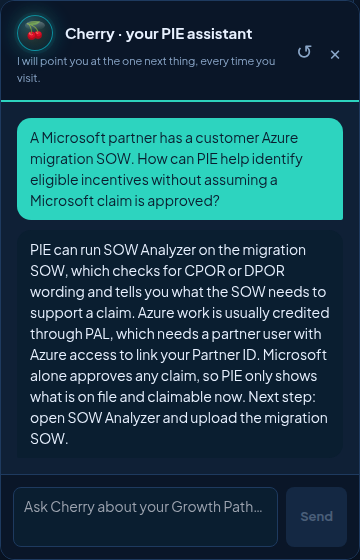
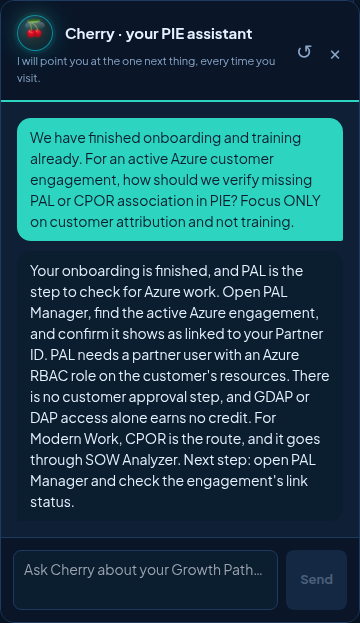
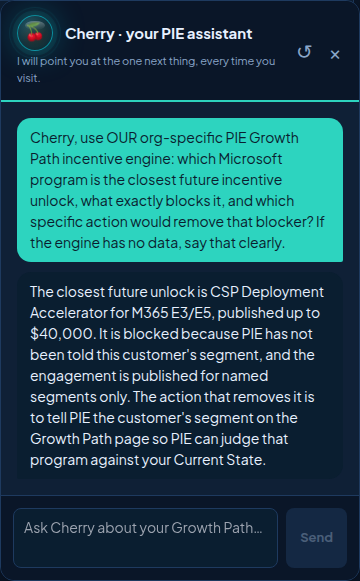
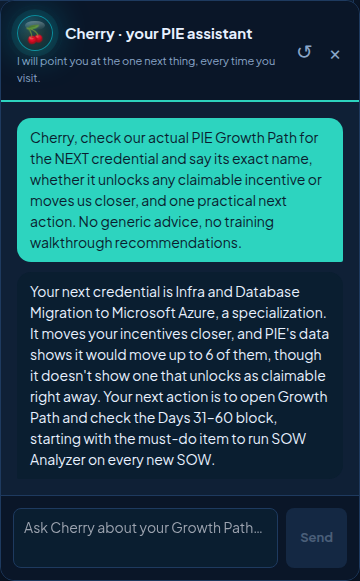
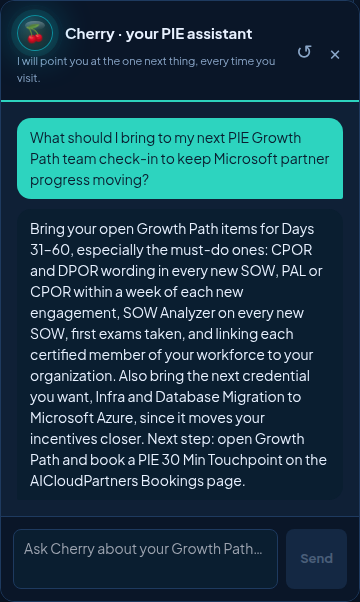
Explore five verified conversations. Cherry's animated presence accompanies each real screenshot. Use the arrows, numbers or swipe; select View the entire conversation to read every message without the website header covering it.
How these examples were captured: Authenticated PIE development-account questions and Cherry's actual replies. The unrelated default onboarding/training reminder and test-account financial teaser were hidden in the screenshot-only view to focus on each business conversation; no reply text was invented or rewritten. Cherry's animated orb is a website demonstration, not an unauthenticated live chatbot. Microsoft rules, partner evidence and approvals govern actual eligibility.
What Cherry actually knows—and what she can help you accomplish
Cherry is connected to the facts PIE has about your organization. That is how she can help prioritize Microsoft partner revenue and readiness, rather than repeat generic information from a training website.
Which incentives are claimable today?
When PIE's eligibility engine has results, Cherry can name the currently claimable programs, their count and each program's individual Microsoft-published up to amount—without adding unrelated ceilings or claiming Microsoft has paid them.
Partner outcome: Focus the team on defensible opportunities already identified by PIE.
What would make another program eligible?
Cherry can identify the closest future incentive opportunities and describe available qualification blockers from PIE's partner-specific engine. That turns “not eligible” into a concrete question about what must change.
Partner outcome: Stop leaving reachable incentive opportunities unexamined.
Which next credential actually matters?
Where the engine identifies a next credential, Cherry can name it and show how many incentive paths it could open or move closer. The decision starts with business impact—not “finish another training walkthrough.”
Partner outcome: Direct skilling investment toward a verified Microsoft program gap.
What should your team do this week?
Cherry knows the current 30-day Growth Path phase, pending must-do items, the partner's chosen step order and allowed skips. She helps prioritize the next relevant action and provides routes into the PIE modules that perform the work.
Partner outcome: Move from a 90-day ambition to an actionable weekly plan.
Why can't we move forward yet?
Inside guided onboarding, Cherry can read the current blocking step and PIE's fix guidance, including Global Admin consent, mailbox setup and Partner Center exports. She helps the responsible person get back to the next required action.
Partner outcome: Less stalled onboarding and less time chasing ambiguous setup issues.
How do we keep the growth plan moving?
Partners can review their Growth Path progress, completed and skipped actions, the next move and existing check-in notes. Cherry helps prepare useful follow-up questions, with a route to book a real PIE-team Teams session when human help is needed.
Partner outcome: Turn progress and blockers into measurable next steps.
Product accuracy: Availability depends on the partner's actual PIE Current State and enabled features. Cherry guides actions; specialized PIE modules and Microsoft approval processes carry out and validate the underlying work. Autonomous email, SMS and push reminders are not represented here as Cherry-delivered features.
What Follow-Through Looks Like in a Real Working Week
See what is unfinished
Review incomplete Current State items, the current Growth Path step and the certification or customer-association work that needs attention.
Act in the right module
Use PAL Manager, SOW Analyzer, Workforce or Certify Accelerator for the actual work. Cherry provides context and next-step guidance; the specialized PIE feature holds the workflow.
Close the loop
Bring open questions, blockers and progress to your scheduled PIE team conversation, then revisit the 90-day plan for the next priority.
Reminders, notifications and task follow-through: what is actually different?
Cherry is the partner-facing guide to priorities, explanations and follow-ups. PIE also has separate workflow mechanisms for items such as Current State refresh reminders and workforce certification-expiry awareness. Those services are not proof that Cherry independently operates an email/SMS/push notification engine or executes tasks unattended. Exact reminders and delivery channels depend on the enabled PIE release and partner configuration.
Why this matters: You do not need another generic answer about Microsoft partnerships. You need a reliable path from your current facts to the next useful action, then a way to see what still needs attention. That is the job Cherry and the connected PIE tools are designed to address.
Interactive: Find Your Starting Move
Choose your current partnership stage and preview the kind of advice PIE might prioritize. This is a free example—not a live account lookup or an eligibility decision.
Finish onboarding, check the Partner Center qualification view and confirm your workforce and customer associations before committing to your first target.
The PIE Platform Behind Every Cherry Recommendation
Cherry guides the conversation, but the real work happens in PIE's connected modules. This matters because it lets one small partner team move from discovering an opportunity to documenting the evidence and following the claim instead of restarting the process in disconnected spreadsheets.
| PIE capability | Business value to a Microsoft partner | Explore |
|---|---|---|
| Guided onboarding + Current State | Collect partner qualifications and identify missing setup or source data before judging eligibility; supports recurring freshness checks. | Get started → |
| Growth Path + Cherry | A partner-aware 90-day sequence, progress and one next step, with explanations of blockers and the path toward a designation. | Growth Path → |
| PAL Manager | Work toward the right association for eligible Azure engagements rather than leaving customer work unattributed. | PAL Manager → |
| SOW Analyzer | Review existing and proposed SOWs for applicable Microsoft incentive paths, evidence needs, stacking constraints and improved scope language. | SOW Analyzer → |
| SOW Tracker | Keep engagement status, lifecycle gates and associated reports together after analysis, rather than losing the deal after the initial review. | SOW Tracker → |
| Incentive Claims | See the matched incentive workflow, claim preparation and progression toward Microsoft review and eventual payment. | Claims → |
| ISSI Evidence | Organize specialization requirements, supporting controls and evidence needed to maintain or pursue eligibility. | ISSI Evidence → |
| Workforce Intelligence | Understand certification coverage, skill gaps and expirations before those gaps affect your growth plan. | Workforce → |
| PIE Certify Accelerator | Use the certification study plans included with PIE to prepare your workforce for relevant Microsoft exams. | Certify → |
| Training + Dashboard | Learn the platform through 12 interactive walkthroughs and review pipeline and progress in PIE's reporting experience. | Sign in to PIE → |
One workflow, not ten purchases: A partner can move from verified Current State to a customer engagement, SOW analysis, qualification evidence, the appropriate claim path and future workforce growth. Cherry keeps the next step understandable; the dedicated module and Microsoft's rules determine what can actually be done.
For more on skilling, read the Solutions Partner certification guide. PIE members can use PIE Certify Accelerator as part of their partnership; it is distinct from a separately sold CERTIFY-Pro subscription.
A 20-Minute Weekly Review Your Small Team Can Actually Run
Open PIE alongside the authoritative Microsoft Partner Center view. Ask five questions: What Current State data changed? Which customer association is incomplete? Which SOW has the next evidence-backed claim action? Which certification or renewal needs an owner? What blocker should your PIE team help remove at the next check-in?
Assign a person and next action in the appropriate PIE workflow. Cherry can clarify the priority and relevant screen; she does not imply a task was executed or an outbound notification sent. Check actual Partner Center scores rather than claiming PIE awards designation points.
Five Meaningful Outcomes to Measure at Day 90
- Reliable Current State: What partner data has been verified, and what remains missing?
- Correct customer association: Which eligible engagements are associated through the right PAL, CPOR or DPOR procedure?
- Relevant workforce progress: Who is certified and properly linked to your partner organization?
- Incentive readiness: Which SOWs produce defensible opportunities and an evidence-backed claim plan?
- Your next milestone: Which actual Partner Center metric needs work, and who owns the next action?
An incentive ceiling is not a paid claim. PIE helps identify and investigate potential opportunities, but Microsoft rules, approval and proof determine payment. If you are considering several incentives on one engagement, check the individual program stacking rules rather than adding the largest published caps together.
Five Mistakes That Hold SMB Partners Back
- Trying to earn points with no attribution. Confirm required customer association early, not after the project ends.
- Assuming every certification counts. Read the requirements for the right solution area and partner qualification track.
- Using PAL, CPOR and DPOR interchangeably. They cover different activities; see the attribution comparison.
- Presenting a program cap as partner revenue. Don't describe “up to” as an earned payout.
- Confusing a 90-day plan with a guaranteed badge. Track actionable inputs and verified Microsoft outcomes.
Stop Guessing What Your Next Partner Move Should Be
PIE combines the Current State of your partnership, customer credit, skilling, SOW analysis, incentive readiness and guided actions into one 90-day journey. See how Growth Path and Cherry help you take the next step.
Explore PIE's 90-Day Growth Path →Frequently Asked Questions
Can a small Microsoft partner earn a Solutions Partner designation?
Yes. Microsoft offers SMB attainment tracks in several solution areas. A designation requires a Partner Capability Score of at least 70 out of 100 with nonzero points in each required metric. Review your qualification status and track in Partner Center.
Can PIE get my company designated in 90 days?
PIE provides a 90-day growth plan, not a guaranteed Microsoft designation. Timelines depend on your existing customers, eligible certifications, partner associations, deployment activity and Microsoft's qualification review.
What is PIE Growth Path?
Growth Path is an eight-step guided partner journey organized into three 30-day blocks, based on your Current State. It connects onboarding, team check-ins, Microsoft seller relationships, customer attribution, training, certifications and SOW incentive analysis, with partner progress and next steps.
How does Cherry help my team?
Cherry is your PIE assistant for Growth Path, onboarding and incentive questions. She can interpret your available partner context, point out the next guided move, explain a blocker, and help you decide what to follow up before a PIE team check-in. Cherry does not autonomously submit Microsoft claims or invent partner earnings.
How are PAL, CPOR and DPOR different?
PAL applies to eligible Azure partner associations after customer-granted access. CPOR is a claims-based partner association for applicable Microsoft 365, Security and Business Applications engagements, subject to its specific proof requirements. DPOR is selected by the customer on relevant Enterprise Agreement subscriptions. They are not interchangeable.
Can one SOW contribute to growth and incentive claims?
Possibly. A correctly scoped SOW can clarify deliverables, support required evidence and reveal multiple incentives when stacking rules permit. PIE SOW Analyzer highlights potential paths and gaps. Microsoft rules, partner qualifications, approvals and evidence control what is ultimately claimable and payable.
What should I verify before submitting a Microsoft incentive claim?
Start from the actual customer SOW and the specific program rules. Check partner qualifications, required PAL, CPOR or DPOR associations, signed evidence and delivery proof, deadlines and stacking restrictions. A potential opportunity is not an approved or paid claim. PIE can organize the next action; Microsoft decides eligibility, approval and payment.
Does Cherry automatically send reminders and complete tasks?
Cherry supports in-product priorities and follow-up guidance. PIE also has separate reminder workflows, including Current State refresh and certification-expiry awareness. This does not mean Cherry independently emails or texts customers, sends push notifications or executes unfinished tasks; availability depends on the configured PIE release.
Updated October 21, 2026. Verify PCS rules, SMB track requirements and customer-association guidance with Microsoft. PIE Growth Path is independently developed by AICloudPartners. Exact features can depend on current product release and partner account.