See SOW Analyzer in Action
Real product screenshots — not mockups. This is what you see the moment you upload a SOW.
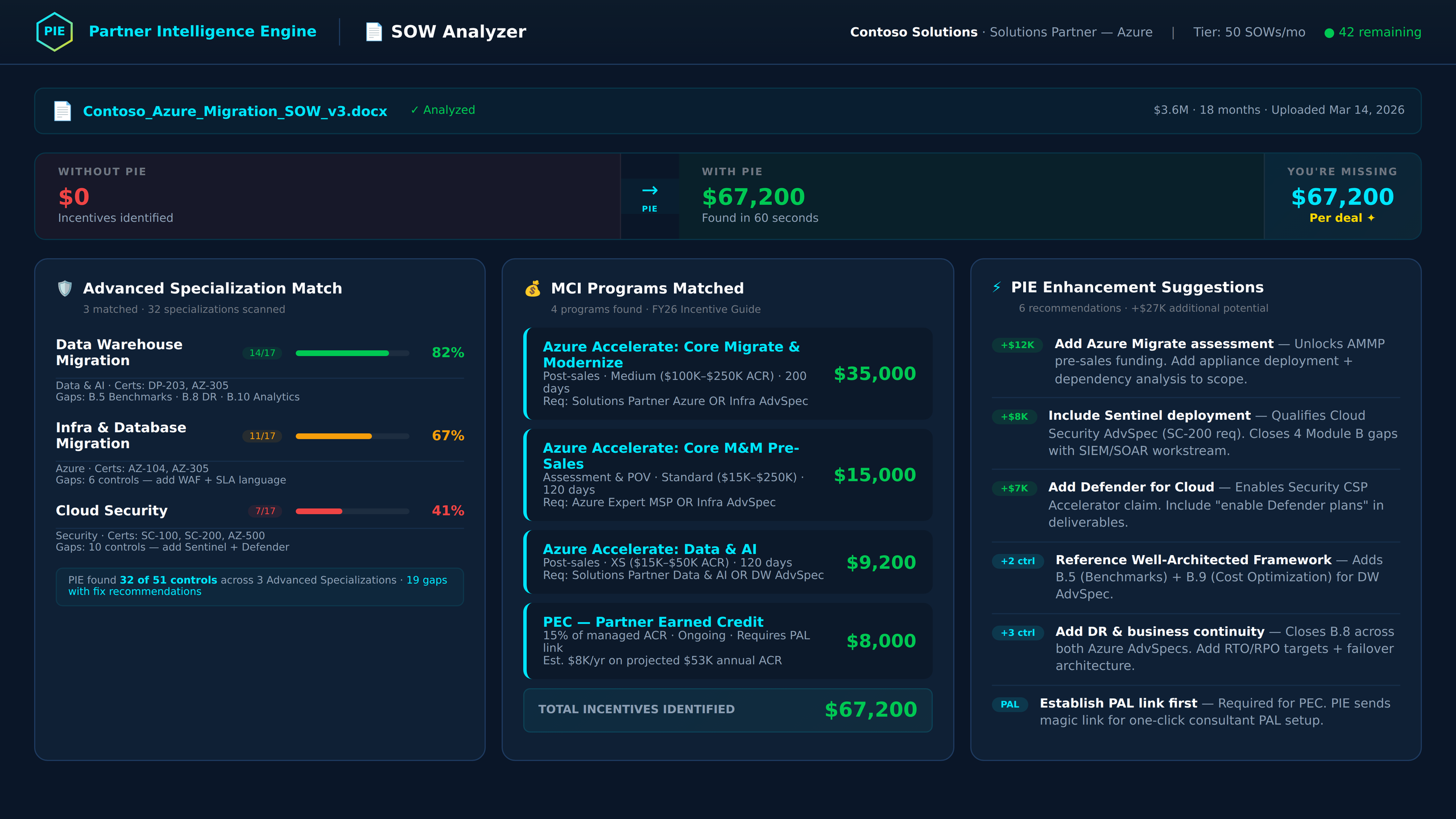
Three-Tier Gap Analysis
Results are sorted into three tiers: Qualifies (green) — programs your SOW already meets, ready to claim. Could Qualify (gold) — programs you're close to, with specific enhancement suggestions to get there. Not Eligible (gray) — programs that require prerequisites your SOW doesn't cover. Each program shows estimated dollar value, confidence level, and the specific criteria matched.
Accept, Reject, or Edit Every Suggestion
PIE's Interactive Editor shows your original SOW text alongside PIE's recommended replacement — side by side. Each enhancement shows the dollar value it unlocks and a confidence level (High, Medium, Low). Accept suggestions you agree with, reject the ones you don't, or edit the text directly. Accepted changes generate an enhanced SOW document ready for download.
Role-Based Presets & Downloads
The Output Selection screen offers role-based download presets — Alliance Manager, Delivery Lead, Partner Admin — each pre-selecting the most relevant outputs. Downloads include Executive Briefing (branded 5-page DOCX), Enhanced SOW (modified document with accepted changes), Analysis Summary, and AdvSpec Evidence Checklist (XLSX). One click per download, all PIE-branded.
Dollar Values on Every Suggestion
PIE doesn't just tell you what you missed — it tells you exactly how much each change is worth. Enhancement suggestions are grouped by strategy (SOW Structure, Azure Terminology, Partner Attribution) with confidence levels (High, Medium, Low) and the specific incentive program each suggestion unlocks. After accepting, PIE detects newly qualified programs and surfaces a "Check for New Programs" action.
60-Second Analysis
Upload → Analyze → Results in under a minute. PIE's AI engine scans your SOW against all Microsoft incentive programs and 28 Advanced Specializations simultaneously. Live progress animation shows each stage.
Three-Tier Gap Analysis
Qualifies (green) = ready to claim. Could Qualify (gold) = enhancement suggestions will get you there. Not Eligible (gray) = missing prerequisites. Every tier shows dollar values and confidence levels.
Interactive Editor
Side-by-side original vs. PIE suggestion with accept/reject/edit per enhancement. Progress bar tracks decisions. Accepted changes generate the enhanced SOW document for download.
Dollar-Value Enhancements
Every suggestion shows the specific dollar amount it unlocks, the confidence level (High/Medium/Low), the program it targets, and a rationale explaining why the change matters for qualification.
Executive Briefing
Server-generated branded 5-page DOCX with analysis summary, program matches, enhancement recommendations, and next steps. PIE-branded formatting — hand it directly to leadership or your Microsoft PDM.
Enhanced SOW Download
Modified DOCX with all accepted enhancement changes applied to the original document. Your delivery team gets a revised SOW ready for customer negotiation — no copy-paste required.
Deep Discovery vs Quick Scan
Analysis mode toggle on Screen 1: Deep Discovery runs the full AI engine for comprehensive results. Quick Scan focuses on top-matching programs for faster turnaround. Choose per SOW.
Domain at the Gate
Customer domain is captured on Screen 1 before analysis begins. Every SOW is tagged with the customer it belongs to — enabling domain-level tracking across SOW Tracker, Claims, and Partner Admin Link.
Role-Based Output Presets
Screen 6 offers preset download bundles for Alliance Manager, Delivery Lead, and Partner Admin — each pre-selecting the outputs most relevant to that role. One click for your workflow.
Tier-Based SOW Limits
Growth (up to 25/month), Enterprise (up to 50/month). Usage counter shows remaining analyses. Each analysis counts once regardless of how many times you revisit results.
AdvSpec Control Mapping
When AdvSpec mode is enabled, PIE maps your SOW to specific Module B audit controls across all 28 specializations. Results flow directly into ISSI Evidence for audit readiness tracking.
RBAC Enforced
Viewer role can browse past analyses and download outputs but cannot upload new SOWs, accept enhancements, or modify results. All write operations gated at both frontend and backend (403).