πŸ‘₯ WORKFORCE INTELLIGENCE

Your Team. Your Certs. Your Revenue.

PIE gives you real-time visibility into team deployment, certifications, engagement assignments, and bench availability β€” connecting your workforce to incentive qualification, specialization requirements, and revenue outcomes.

Book a 15-Minute Demo β†’See It In Action ↓

Included with all PIE plans. Syncs with Microsoft Partner Center and Entra ID.

12
Members Tracked
28
Active Certs
75%
Deployment Rate
3
Expiring 30D
βœ“ Multi-source sync: Partner Center + Entra ID
βœ“ Engagement assignment with customer domain tracking
βœ“ Links certs to designation + AdvSpec requirements

How It Works

From team import to revenue-aligned staffing β€” PIE connects your people to your programs.

1

Import Your Team

Sync from Microsoft Entra ID or import via email list. PIE pulls names, roles, certifications, and training data automatically.

2

Assign Engagements

Assign members to client engagements with customer domains, allocation percentages, and engagement dates. Status auto-derives from assignments.

3

Track & Close Gaps

Monitor certs, skills gaps, and roll-off dates. Enroll team members in CERTIFY to close designation gaps in 10 days.

4

Staff for Revenue

Match bench consultants to deals that unlock incentives. Export branded workforce reports for leadership.

See What You Get

This is a complete team management platform β€” not just a roster with status badges.

WORKFORCE SCORECARD + MEMBER DIRECTORY
Your Entire Team β€” One Dashboard

The scorecard shows 6 key metrics: Billable, Bench, PTO, Roll-Off 90D, Active Certs, and Expiring 30D β€” with deployment percentage tracked against your target. Below it, the Member Directory gives you a searchable, sortable, filterable roster with role, status, allocation, engagement end date, and certification badges per member.
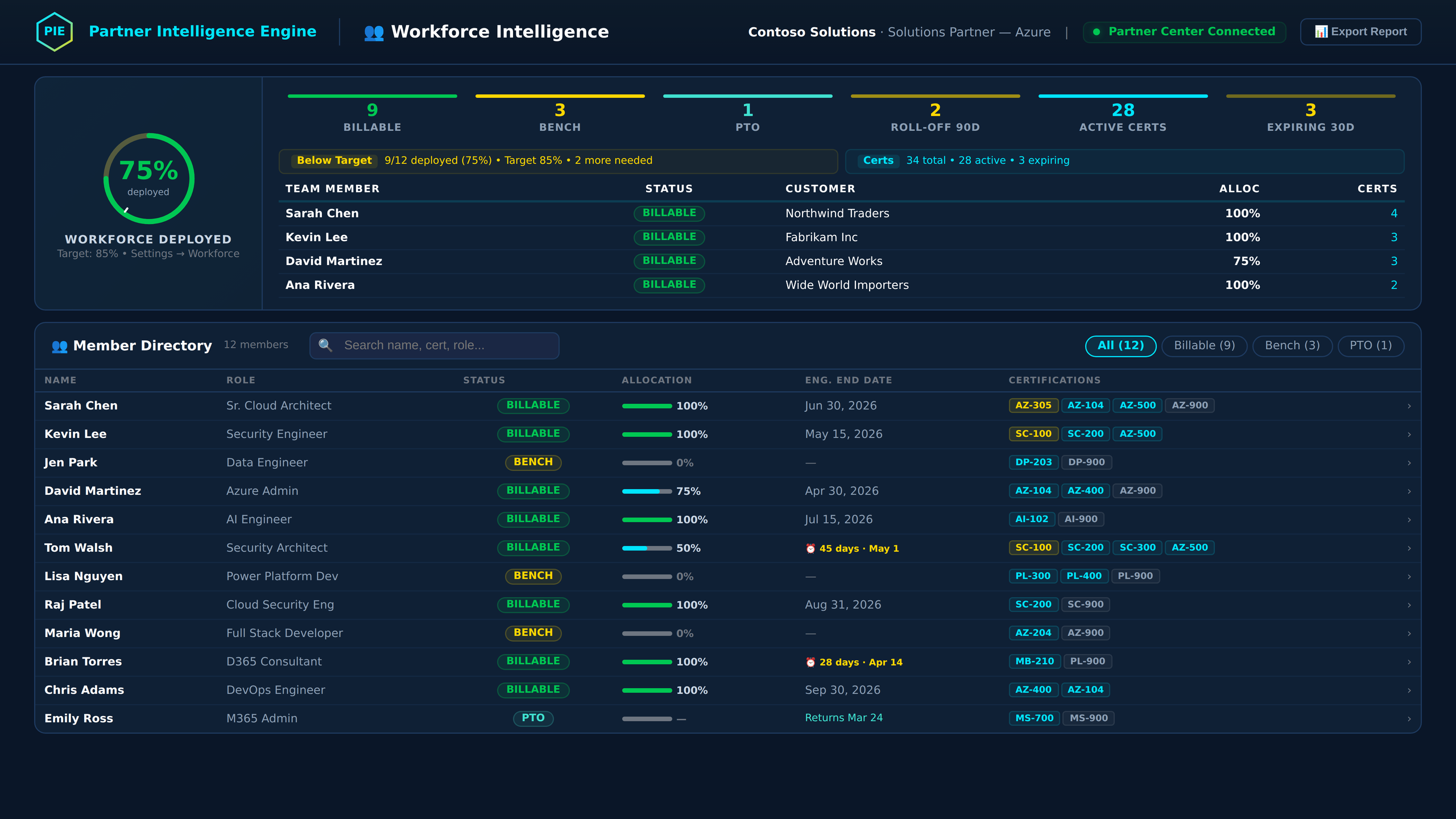
app.aicloudpartners.com β€” Workforce Intelligence
PIE Workforce Intelligence showing 75% deployment rate, 6-metric scorecard, and searchable member directory with certifications
MEMBER DETAIL PANEL
Click Any Member β€” Full Profile Slides In

A slide-in drawer shows the full member profile: certification strip across the top, editable meta fields (role, status, allocation, engagement dates), engagement assignment dropdown with customer domain, and tabbed content for Certifications, MS Learn activity, and Skills Gaps. Edit inline β€” changes save directly to the platform.

Sarah ChenSr. Cloud Architect
AZ-305AZ-104AZ-500AZ-9004 active
Status
● Billable
Allocation
100%
Engagement
Northwind Traders
End Date
Jun 30, 2026
Customer Domain
northwindtraders.com
Designation
SD: Infrastructure
✏️ EditπŸŽ“ CERTIFYπŸ“§ Nudge
PARTNER CENTER + ENTRA ID SYNC
Multi-Source Sync β€” Your Data Stays Current

Configure multi-source sync: Partner Center for certifications and designations, Entra ID for team roster, and training reports for MS Learn activity. Run manually or schedule syncs. Import new members by email β€” PIE looks them up in Partner Center, enriches from Microsoft Graph, and creates their profile automatically.

SYNC SOURCES
πŸ”—
Partner Center
Certifications Β· Designations Β· MPN data
● Connected
🏒
Entra ID (Azure AD)
Team roster Β· Roles Β· Office locations
● Connected
πŸ“Š
Training Reports
MS Learn activity Β· Course completions
Upload CSV
Sync NowImport by Email
SKILLS GAP ANALYSIS
Know Exactly Which Certs Close Which Gaps

PIE maps every team member's certifications to Solutions Partner designation requirements and Advanced Specialization prerequisites. See which certs your org is missing, which team members should earn them, and enroll directly into CERTIFY β€” 10 days to exam ready. Skills gaps aren't just flagged β€” they're actionable.

DESIGNATION GAPS β€” SD: INFRASTRUCTURE
AZ-104 Β· Azure Administrator3 passed
AZ-305 Β· Solutions Architect2 passed
AZ-700 Β· Network Engineer1 passed Β· 1 needed
AZ-140 Β· AVD Specialty0 passed Β· 2 needed
πŸŽ“ Enroll in CERTIFY β†’ Close Gaps in 10 Days
πŸ“Š

6-Metric Scorecard

Deployment ring tracks target vs. actual. Six cards: Billable, Bench, PTO, Roll-Off 90D, Active Certs, Expiring 30D β€” click any to filter the directory.

πŸ‘₯

Searchable Directory

Full roster with role, status, allocation, engagement end date, and cert badges. Search by name, cert, or role. Filter by Billable, Bench, or PTO. Sort any column.

πŸ“‹

Detail Panel Drawer

Click any member β€” slide-in drawer shows cert strip, editable profile fields, engagement assignment, customer domain, allocation %, and tabbed cert/learning/gap views.

πŸ”—

Engagement Assignment

Assign members to client engagements with customer domain, allocation percentage, start/end dates, and engagement status (pipeline, active, at-risk, complete).

🏒

Multi-Source Sync

Partner Center for certs + designations. Entra ID for roster + roles. Training reports for MS Learn activity. Configure sync preferences and run manually or scheduled.

πŸ“§

Import by Email

Add team members by email list. PIE looks them up in Partner Center, enriches from Microsoft Graph (name, role, office), and creates profiles automatically.

πŸŽ“

Skills Gap Analysis

Maps certs to Solutions Partner designations and AdvSpec prerequisites. Shows which certs are missing, who should earn them, with direct CERTIFY enrollment.

⏰

Roll-Off & Expiry Alerts

Engagement end dates flagged at 30/60/90 days. Cert expirations surfaced before they lapse. Plan staffing moves and renewals before they become emergencies.

πŸ—„οΈ

Archive & Data Retention

Bulk archive members with full retention history. Per-row or select-mode archiving. Restore archived members anytime. Complete audit trail of all changes.

πŸ”‘

Magic Link Onboarding

Generate self-onboarding links for new team members. They complete their own profile β€” certifications, skills, availability. No admin data entry required.

βš™οΈ

Auto-Derived Status

Member status auto-derives from engagement data: active engagement β†’ Billable, ended/none β†’ Bench, override available. No manual status toggling.

πŸ“‘

Branded XLSX Export

One-click branded Excel report with deployment metrics, certification coverage, skills gaps, and full member roster. Professional format ready for leadership review.

Part of the PIE Flywheel

Workforce ensures the right people are deployed to the right deals β€” completing the PIE flywheel.

Analyze β†’ Enhance β†’ Certify β†’ Track β†’ Attribute β†’ Staff

SOW Analyzer finds the programs. Claims tracks the money. ISSI Evidence proves qualification. Partner Admin Link establishes attribution with customer domains from Workforce. CERTIFY closes cert gaps identified in Skills Gap Analysis. Workforce connects everything to your team.

Included with Every PIE Plan

Workforce Intelligence is part of the full PIE platform β€” not an add-on.

$299/month

Starting price Β· Starter plan Β· Up to 10 members

βœ“ SOW Analyzerβœ“ Incentive Claimsβœ“ ISSI Evidenceβœ“ Partner Admin Linkβœ“ Workforceβœ“ CERTIFY
Book a Demo β†’

Frequently Asked Questions

How do I import my team?
Three ways: sync from Microsoft Entra ID (pulls your full Azure AD roster), import by email list (PIE looks up each email in Partner Center and enriches from Microsoft Graph), or add members manually. Certifications sync automatically from Partner Center when connected.
How does engagement assignment work?
Click any member to open their Detail Panel, then assign them to a client engagement. PIE tracks the customer name, customer domain, allocation percentage, start date, and end date. Member status auto-derives: active engagement = Billable, ended or none = Bench. You can also override status manually.
What is the Detail Panel?
When you click any member in the directory, a slide-in drawer shows their full profile: certification strip across the top, editable meta fields (role, status, allocation, engagement dates, customer domain), and tabbed views for Certifications, MS Learn activity, and Skills Gaps. Edit inline β€” changes save directly to the platform.
What does multi-source sync include?
PIE syncs from three sources: Partner Center (certifications, designations, MPN data), Entra ID (team roster, roles, office locations), and Training Reports (MS Learn course completions, uploaded as CSV). Configure sync preferences, run manually, or review sync history in the admin panel.
How does skills gap analysis work?
PIE maps every team member's certifications to Solutions Partner designation requirements and Advanced Specialization prerequisites. The Skills Gap tab shows which certs your organization needs, which team members are closest to earning them, and offers direct enrollment into CERTIFY β€” 10 days to exam ready.
Can I archive and restore members?
Yes. Archive individual members from their row or use select mode for bulk archiving. All archives include retention history with timestamps and the admin who performed the action. Archived members can be restored at any time β€” nothing is permanently deleted.
What are magic link onboarding?
Generate a self-onboarding link for new team members. They click the link, fill in their own profile (certifications, skills, availability), and their record is created in PIE automatically. No admin data entry required β€” the member provides their own information.
Is Workforce a separate product?
No β€” Workforce Intelligence is included with every PIE plan starting at $299/month. Member limits scale by plan: Starter (10), Growth (25), Scale (50), Enterprise (unlimited). All six modules work together as one integrated platform.

Know Your Team. Staff for Revenue.

Your team is your biggest asset and your biggest cost. PIE connects every consultant to the deals, certs, and programs that maximize incentive capture.

Book a 15-Minute Demo β†’

See your workforce dashboard in 60 seconds. No commitment required.