πŸ”— PARTNER ADMIN LINK

Claim Credit for Every Engagement.

PIE manages Partner Admin Link (PAL) attribution across all your customer engagements. Automate the entire PAL workflow, track establishment status in real time, and ensure your firm gets Microsoft partner credit on every Azure subscription you touch.

Book a 15-Minute Demo β†’See It In Action ↓

Included with all PIE plans. PAL links feed ACR tracking and Microsoft partner credit automatically.

75%
Coverage in Demo
9/12
Consultants Linked
$7.2M
ACR Tracked
1-Click
Bulk Send All
βœ“ Magic link generation per consultant
βœ“ Automated PAL establishment workflow
βœ“ Real-time activity feed with linked/sent/pending status

How It Works

From engagement creation to PAL establishment β€” PIE handles the links so you focus on delivery.

1

Create Engagement

Add a customer engagement with domain, status, and deal value. Domain autocompletes from your engagement history.

2

Assign Consultants

Add team members from Workforce or enter manually. Each consultant gets a unique magic link for that customer's Azure environment.

3

Send Magic Links

One click sends the link via email. Bulk send hits all unlinked consultants at once. Template picker selects PAL Setup or Engagement Setup.

4

PAL Established

Consultant completes the secure Microsoft authorization process. PIE confirms the PAL establishment in the Activity Feed in real time.

See Partner Admin Link in Action

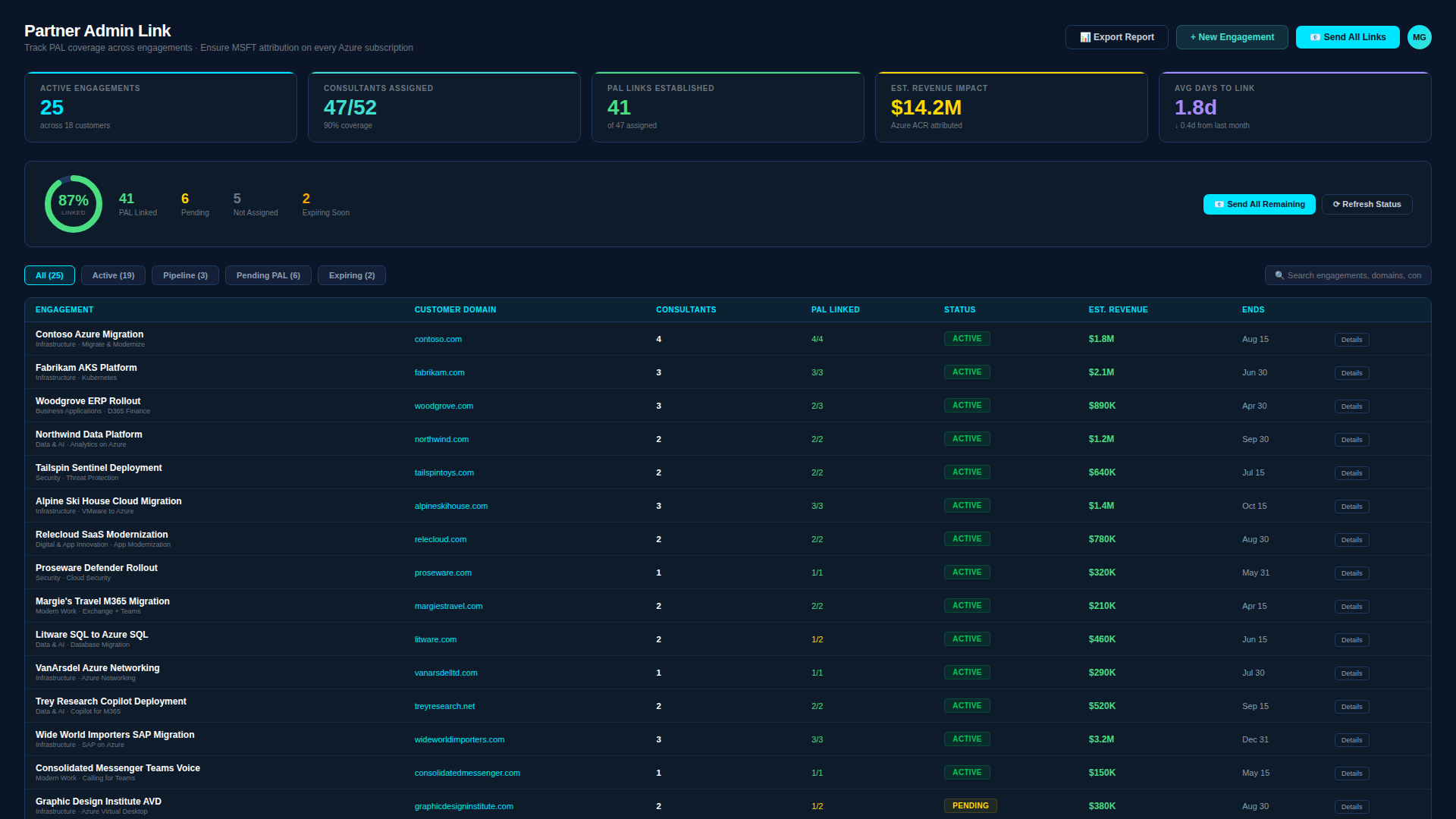
Real product screenshot β€” not a mockup. This is what you see when managing PAL attribution across engagements.
app.aicloudpartners.com/pal-manager
PIE Partner Admin Link β€” Coverage scorecard showing 87% linked across 25 active engagements, 47 consultants assigned, $14.2M Azure ACR attributed, engagement table with PAL status, and real-time activity feed
PAL COVERAGE SCORECARD

Know Your Coverage at a Glance

The Coverage Scorecard shows a hero ring with your overall PAL coverage percentage, plus key metrics: active engagements, consultants linked vs. total, needs action count, total ACR tracked, and average days to link. The engagement table below breaks down each customer with domain, consultant count, linked ratio, status (Active/Pipeline), and end date.

PAL COVERAGE SCORECARD
75%
4
ACTIVE
9/12
LINKED
3
NEEDS ACTION
$7.2M
ACR TRACKED
●Contoso Azure Migration
contoso.com4/4ACTIVE
●Woodgrove ERP Rollout
woodgrove.com2/3ACTIVE
●Northwind Data Platform
northwind.com0/2PIPELINE
ENGAGEMENT SOURCES

Every Consultant, Every Customer

Engagement Sources shows each customer engagement with assigned consultants listed by name. Status badges show linked (green), sent (cyan), and pending (yellow) per consultant. Unlinked and overdue consultants are highlighted with Send/Resend buttons. The "Close the Coverage Gap" bar at the bottom shows how many consultants still need links with a one-click "Send All Remaining" bulk action.

ENGAGEMENT SOURCES β€” 12 CONSULTANTS
Contoso Azure Migration4 linked
contoso.com
R. Kumar, J. Davis, A. Patel, M. Torres
Woodgrove ERP Rollout
2 linked1 pending
woodgrove.com
S. Martinez, C. Lee, T. Okafor
Northwind Data Platform2 sent
northwind.com
P. Anderson, E. Gomez
⚠ 3 consultants need PAL linksSend All Remaining
PAL ACTIVITY FEED

Real-Time Attribution Tracking

The Activity Feed shows a chronological stream of every PAL event: engagements created, consultants added, notifications sent, PAL established, and overdue alerts. Each event shows the consultant name, customer domain, and timestamp. The summary bar at the bottom tracks total linked, sent, and pending counts across all engagements.

PAL ACTIVITY
3 needs action
βœ“
R. Kumar linked to contoso.com
LINKED
βœ‰
Link sent to P. Anderson for northwind.com
2m ago
⚠
T. Okafor β€” woodgrove.com not linked (7d)
Resend
+
K. Wilson added to fabrikam.com
ADDED
+
Engagement Northwind Data Platform created
CREATED
9 linked2 sent1 pending
πŸ”—

Magic Link Generation

Each consultant gets a unique link per customer engagement. One link per consultant per customer β€” PIE handles the routing automatically.

πŸ“€

Bulk Send All

One click sends magic links to every unlinked consultant across all engagements. The "Send All Remaining" button shows exactly how many consultants need links. No more chasing individuals through email threads.

πŸ“Š

PAL Coverage Scorecard

Hero ring shows overall coverage percentage. Key metrics: active engagements, linked vs. total consultants, needs action count, total ACR tracked, and average days to link. Engagement table breaks down per-customer status.

πŸ“‹

Engagement CRUD

Create, update, and archive customer engagements with domain, status (Pipeline/Active/At Risk/Complete), deal value, and end date. Domain autocompletes from your engagement history. Full lifecycle management.

πŸ‘₯

Consultant Management

Add team members from your Workforce roster or enter manually. Multi-select "Add Team" picker pulls from Workforce with names, roles, and certifications. Each consultant tracks across multiple engagements.

πŸ“°

Activity Feed

Chronological stream of every PAL event: engagements created, consultants added, notifications sent, PAL established, and overdue alerts. Each event shows name, domain, and relative timestamp.

βœ‰οΈ

Email Template Picker

Choose between PAL Setup (focused on the consent step) and Engagement Setup (broader onboarding context) email templates. Templates include the magic link, consultant name, customer domain, and clear instructions.

⚠️

Overdue & Unlinked Alerts

Consultants who haven't completed the PAL process are highlighted with day count and Resend buttons. The "Close the Coverage Gap" bar shows exactly how many links are outstanding across all engagements.

🌐

Domain Autocomplete

Customer domain field autocompletes from your engagement history and SOW Analyzer results. Domain at the Gate ensures every engagement is tagged to the right customer β€” no typos, no duplicates.

πŸ—„οΈ

Engagement Archiving

Archive completed engagements with soft-delete. Activity history is preserved β€” you can always look back at who was linked, when, and for which customer. Consultant archiving also tracks retention history.

πŸ“‘

Branded XLSX Export

One-click export generates a branded Excel workbook with engagement summary, consultant status per customer, linked/pending/sent counts, and ACR tracking. PIE-branded formatting β€” ready for leadership reporting.

πŸ”’

RBAC Enforced

Viewer role sees the scorecard and activity feed but cannot create engagements, send magic links, or archive. All write operations gated at both frontend and backend. Shared mailbox configuration alerts prevent email issues.

Part of the PIE Flywheel

Partner Admin Link ensures Microsoft knows your firm is driving the work β€” connecting attribution to every dollar.

Analyze β†’ Enhance β†’ Certify β†’ Track β†’ Attribute β†’ Staff

SOW Analyzer finds the programs. Incentive Claims tracks the money. ISSI Evidence proves you qualify. Partner Admin Link establishes the attribution link between your consultants and customer Azure subscriptions β€” so Microsoft credits your firm for the work. Workforce ensures the right certified people are assigned.

Included with Every PIE Plan

Partner Admin Link is part of the full PIE platform β€” not an add-on.

$299/month

Starting price Β· Starter plan Β· No annual lock-in

βœ“ SOW Analyzerβœ“ Incentive Claimsβœ“ ISSI Evidenceβœ“ Partner Admin Linkβœ“ Workforceβœ“ CERTIFY
Book a Demo β†’

Frequently Asked Questions

What is PAL (Partner Admin Link)?
Partner Admin Link is Microsoft's mechanism for attributing partner influence on Azure consumption. When your consultant establishes a PAL in a customer's Azure environment, Microsoft credits your firm with Azure Consumed Revenue (ACR) β€” which drives incentive eligibility, competency attainment, and partner ranking. Without PAL, you don't get credit for the work your team does.
How does PIE simplify PAL establishment?
PIE automates the entire PAL workflow. Create an engagement, assign consultants, and PIE handles the rest β€” generating unique links, sending notifications, and tracking establishment status in real time. No spreadsheets, no manual follow-up, no missed attributions.
What does "Send All Remaining" do?
One click sends magic link emails to every consultant across all engagements who hasn't completed the PAL establishment process yet. PIE shows exactly how many links are outstanding β€” "3 consultants need PAL links" β€” so you know the scope before clicking. Each consultant gets an email with their specific magic link and clear instructions.
What's the difference between PAL Setup and Engagement Setup templates?
PIE offers multiple email templates for different scenarios. PAL Setup is focused on the establishment step. Engagement Setup covers broader onboarding context. The template picker lets you choose the right format for each consultant.
How does Partner Admin Link connect to SOW Tracker?
SOW Tracker's Gate 5 (G5) is "PAL Established" β€” it deep-links directly into Partner Admin Link for the relevant engagement. When a consultant completes the PAL process, the status updates in both Partner Admin Link and SOW Tracker simultaneously. The coverage scorecard ACR feeds back into SOW Tracker's deal pipeline value.
Can I add consultants from Workforce?
Yes β€” the "Add Team" picker pulls directly from your Workforce roster. Multi-select consultants by name, role, and certification status. You can also enter consultants manually if they haven't been imported into Workforce yet. Each consultant can be assigned to multiple engagements.
What engagement statuses are available?
Four statuses: Pipeline (deal in progress, not yet started), Active (delivery underway), At Risk (needs attention β€” deadline approaching or consultants unlinked), and Complete (engagement finished). Status drives the scorecard metrics and determines urgency levels for PAL coverage gaps.
What happens when I archive an engagement?
Archived engagements are soft-deleted with timestamps and admin attribution. All activity history β€” who was linked, when links were sent, which consultants completed consent β€” is preserved. Archived engagements don't count toward active scorecard metrics but remain accessible through the Archive Management page.
Is Partner Admin Link a separate product?
No β€” Partner Admin Link is included with every PIE plan starting at $299/month. All six PIE modules work together. SOW Analyzer identifies the programs, Claims tracks the money, and Partner Admin Link ensures your firm gets credit for the work via Microsoft's attribution system.

Stop Losing Credit for Work You're Already Doing

Every unlinked consultant is Azure consumption your firm doesn't get credit for. PIE closes the coverage gap automatically.

Book a 15-Minute Demo β†’

See your PAL coverage in 60 seconds. No commitment required.