See ISSI Evidence in Action
Real product screenshots — not mockups. This is what you see the moment you open PIE.
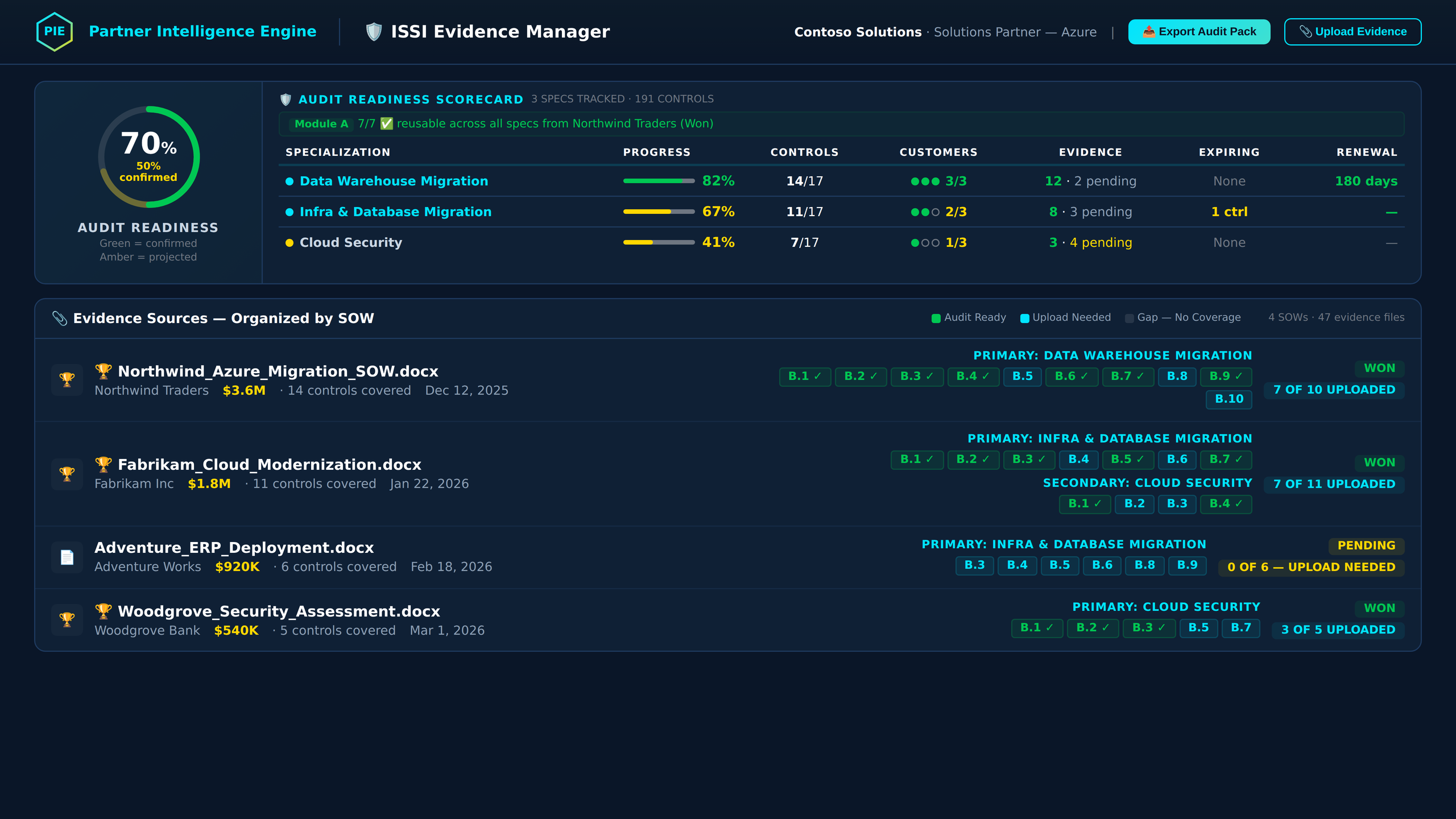
Know Exactly Where You Stand
The Audit Readiness Zone shows a hero ring with your overall readiness percentage, plus a 7-column spec table with every tracked specialization. Each row shows control counts, evidence uploaded vs. needed, and a visual progress indicator. Primary specs show in cyan, secondary in purple — so you know where to focus your team's effort first.
Every SOW Mapped to Controls
Evidence sources are organized by SOW — see which deal covers which controls, how many files are uploaded vs. pending, and which specialization each SOW supports. Control pills show green for uploaded, cyan for SOW-mapped but awaiting upload, and gray for gaps still needing evidence.
Drag-and-Drop Per Control
Expand any specialization to see its ModuleAccordion — every Module B control listed with evidence status. Drag-and-drop files directly onto a control slot, or click to browse. PIE tracks upload timestamps, file names, and confirmation status. Filter by covered controls, uploaded only, or gaps needing attention.
Walk In Ready to Pass
Export a complete audit evidence pack: branded Word document organized by specialization and control, plus an Excel workbook with customer names, evidence file references, and control status. Your third-party auditor gets a professional package that maps directly to Microsoft's audit checklist — no scrambling to find files.
Auto-Mapped Controls
When you analyze a SOW with AdvSpec mode enabled, PIE automatically maps SOW content to Module B controls. No spreadsheet tracking — PIE knows which controls each SOW covers and assigns them instantly.
Audit Readiness Ring
Hero ring scorecard shows confirmed vs. projected readiness percentage. The 7-column spec table breaks down each tracked specialization: control counts, evidence uploaded, evidence needed, and a visual progress bar per row.
Drag-and-Drop Evidence
The EvidenceUploader component lets you drop files directly onto a control slot. PIE tracks file name, upload timestamp, and confirmation status. Upload per-control or bulk upload across a specialization.
Module A Waiver Tracking
Module A covers general partner practices (project management, customer satisfaction, security). PIE tracks waiver eligibility across specializations — reuse passing scores from prior audits to skip redundant reviews automatically.
Primary & Secondary Specs
Color-coded specialization tracking: primary specs render in cyan, secondary in purple. Instantly see where your strongest evidence exists vs. where you're building toward future audit readiness.
SOW-Organized Sources
Evidence sources grouped by originating SOW with customer name, deal value, specialization alignment, and control pills. Green = uploaded, cyan = SOW-mapped awaiting upload, gray = gap still needing evidence.
Export Audit Pack
One-click branded export generates both a Word document and Excel workbook organized by specialization and control. Includes customer names, evidence file references, and control status. Auditor-ready formatting with PIE branding.
SOW-Level Batch Archive
Archive evidence sources at the SOW level. The confirmation modal shows evidence file count and control coverage being archived. SOW archive cascades from SOW Tracker — child evidence preserves activity history.
Control Coverage Filtering
Filter your view by covered controls, uploaded-only, or gaps in the checklist. Focus your team on what's missing instead of scrolling through what's already confirmed. Filter persists across specialization switches.
90-Day Intelligence
Time-series trend data shows evidence upload activity, readiness score changes, and milestone markers over the past 90 days. See whether your team is building momentum toward audit or losing ground.
Renewal Tracking
Track 2-year audit cycles and 1-year label renewals per specialization. PIE surfaces upcoming expirations with countdown timers so you never lose a specialization you've already earned.
RBAC Enforced
Viewer role sees the full dashboard and readiness data but cannot upload evidence, archive sources, or export audit packs. All write operations gated at both frontend and backend (403 enforcement).